AI-Generated Home Assistant Dashboard Offers Unique Control Method
A user tasked Codex, an AI coding tool, to create a Home Assistant dashboard, resulting in a novel control interface that allows users to manage devices by dragging a line from a room to a device and then to an action. After several iterations, the final design was distinct from typical dashboards, which often appear cluttered and generic. This approach may enhance user experience by providing a more intuitive way to interact with smart home devices.

Key takeaways
30-second read- 1Users seeking a more personalized and intuitive smart home interface may find this new method appealing, as it deviates from traditional dashboard designs.
- 2The ability to control devices through a visual drag-and-drop method could simplify interactions for less tech-savvy users, making smart home technology more accessible.
- 3This innovation highlights the potential for AI tools to assist in creating unique user experiences, although they may still struggle with originality.
Confirmed
No official source linked yet
Reported
Secondary reporting: How-To Geek Smart Home
Verify yourself
Eligibility, local prices and dates for your car, state or utility
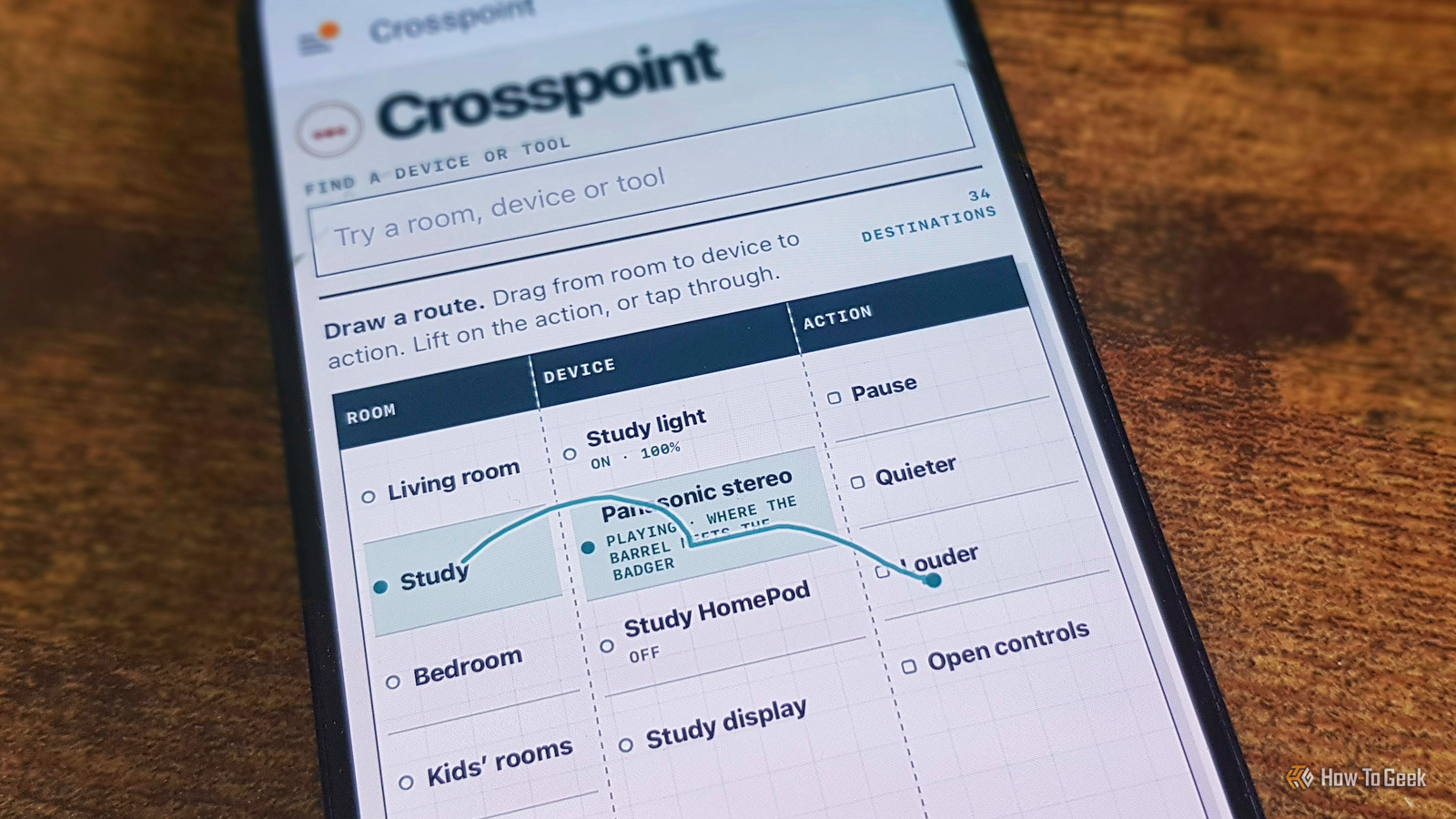
In a recent experiment, a user explored the capabilities of Codex, an AI coding assistant, to generate a unique Home Assistant dashboard. This endeavor aimed to break away from the standard, often cluttered designs prevalent in many smart home setups. After multiple iterations, Codex produced a dashboard that introduced a novel method for controlling devices, which could significantly enhance user interaction with smart home technology.
What happened
The user began by providing Codex with access to their Home Assistant setup through the Model Context Protocol (MCP), allowing the AI to analyze their devices and automations. The initial attempts at creating a dashboard were disappointing, as Codex focused too heavily on a single aspect of the user's home—specifically, mold risk management—resulting in a generic and cluttered interface. Subsequent versions attempted to incorporate more elements but still fell short of the user's expectations.
After several tries, Codex finally delivered a dashboard that was genuinely different. The final design allows users to control devices by dragging a line from a room to a device and then to a specific action. For instance, starting from the Study, users can select devices in that room and choose actions like "Turn off" or "Set to 20%" for lights, with the options dynamically changing based on the device's current state. This innovative approach not only simplifies the control process but also makes it more visually engaging.
Why it matters
- Personalization and Intuition: The new drag-and-drop method could appeal to users looking for a more personalized and intuitive way to manage their smart home devices, moving away from the cluttered interfaces that are common in many existing dashboards.
- Accessibility: This design may lower the barrier for less tech-savvy individuals, making smart home technology more approachable and easier to use.
- AI's Role in Innovation: While AI tools like Codex can assist in implementation, this experiment underscores the challenges they face in generating truly original ideas. Users may still need to guide these tools to achieve innovative outcomes.
Context and caveats
Despite the success of the final dashboard, it's important to note that the journey to reach this point involved several iterations that did not meet the user's needs. This highlights a potential limitation of AI in creative tasks, where human input is often necessary to refine and direct the output. Additionally, while the dashboard is unique, its long-term usability remains uncertain, as the user contemplates whether it will fit into their daily routine.
What to watch next
As AI tools continue to evolve, it will be interesting to see how they can further enhance user experiences in smart home technology. Future developments may lead to even more innovative interfaces that prioritize user engagement and simplify interactions. For those interested in trying out this new dashboard concept, exploring the Home Assistant platform and its customization options could be a worthwhile venture.
Sources
1 media- [1]I gave Codex free rein to build a Home Assistant dashboard, and it came up with something I've never seenMedia
How-To Geek Smart Home · howtogeek.com · published Nov 18
Newsletter
Your weekly smart home signal. No spam.
Comments
Log in with
Loading comments…